
Quiet hours
Give a whole space a window each night where it sends nothing.
Quiet hours are a nightly window in which a space stops announcing people. They apply to everyone in it, not just to you, and only the owner of the space can set them - see Roles in a space.
Setting them
Open the space, tap the Settings button on it, then Notifications. Quiet hours is the first row. Turn it on and pick the hour it starts and the hour it ends.
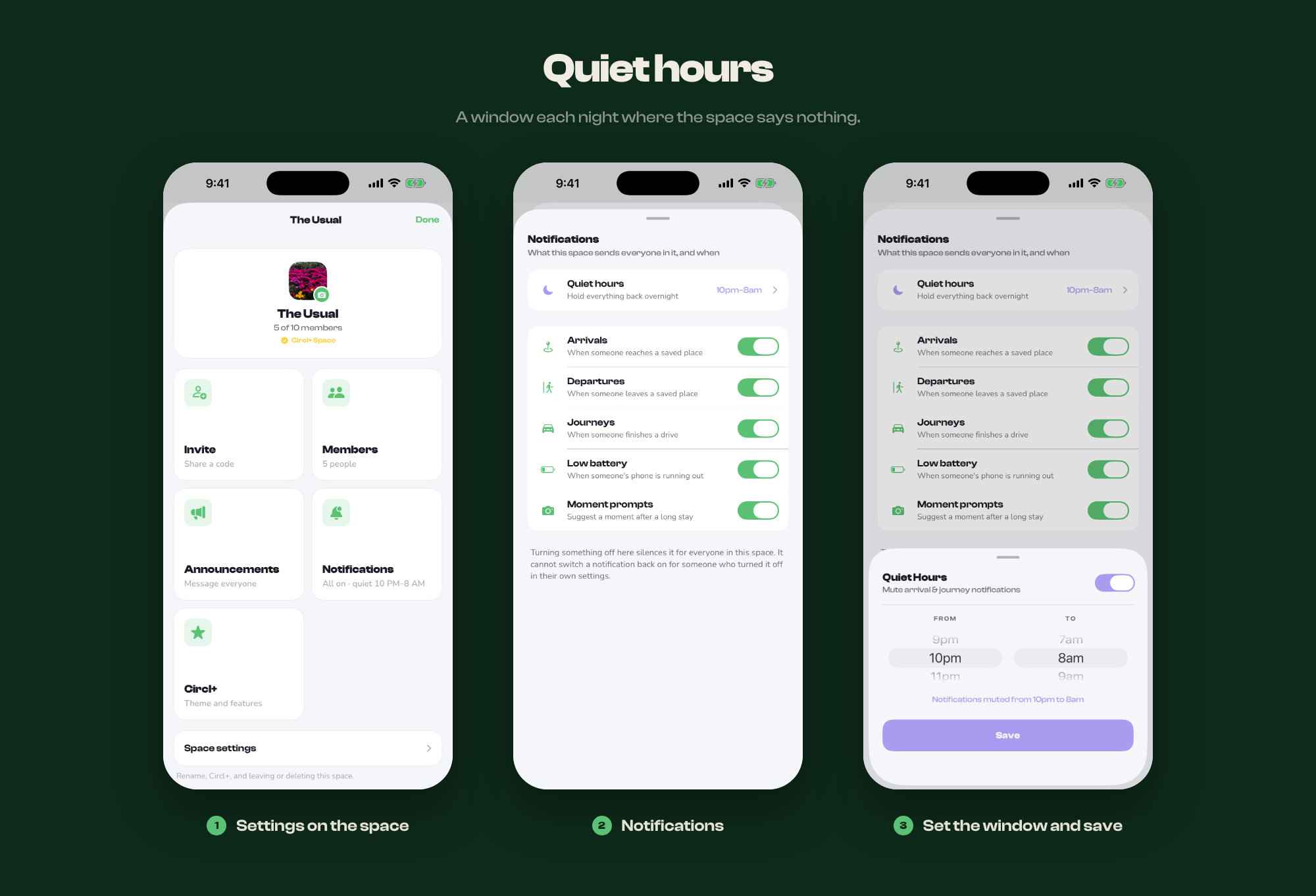
The window is set in whole hours - there is no half past. A window that runs past midnight is fine and is the usual case: 10pm to 8am is the default the picker offers.
It is read in each person's own timezone, so a space whose members are spread across a few of them still goes quiet at everybody's night rather than at the owner's.
Which timezone it follows
Each person's own. A 10pm to 8am window means 10pm to 8am where that member is, not where the owner set it. So in a space split across countries, everyone gets their own night rather than somebody else's: at the same moment the member in London is held quiet at 3am while the member in California, where it is early evening, still hears about an arrival.
The owner sets one window and it means the same thing to everybody, which is usually what a space wants.
The Notifications screen shows the window next to Quiet hours when it is on, and Off when it is not, so nobody has to open it to find out. The Notifications card on the space settings screen says the same thing.
What goes quiet
- Arrivals at a saved place
- Departures from a saved place
- The notification when someone finishes a drive
Nothing is cancelled or lost - the arrivals still happen, they still appear in the activity feed, and the map is still live throughout. Only the push notification is held back.
What stays awake
Pings still come through. That is deliberate: a ping is somebody deciding to reach you personally, at that moment, and the usual reason for doing it at 3am is that it matters. If you want those quiet too, snooze notifications in your own settings or use your phone's focus mode.
Quiet hours or something narrower?
Quiet hours are blunt on purpose - one window, whole space, every day. If the problem is smaller than that, there is usually a better fit:
- One noisy location → make it a quiet place
- One person → mute them
- One kind of alert, permanently → the owner can turn it off in
- Just you, just tonight → snooze in your own